
17959 Dumfries Shopping Plaza, Suite 2B, Dumfries, VA 22026
Phone: 703.862.5500 | Email: contact@synchrocyber.com
Contact us to schedule a conversation about your ICAM, PACS, or USAccess needs.

The FRTC Trust Path Automation Tool is designed to streamline trust-path setup and removal for PACS testing environments that follow the public FIPS 201 EP and FRTC test case documentation. The tool assists PACS vendors, engineering teams, and independent test environments in preparing for APL submissions by automating trust path changes and reducing configuration errors.
The tool is also used internally by organizations responsible for PACS testing to improve efficiency and reduce manual steps in non-public, internal test environments.
Trust-path setup is one of the most error-prone and time-consuming tasks during PACS FRTC pre-submission evaluations. This tool provides repeatability, audit-readiness, and significant time savings for both testing organizations and vendors preparing for submission.
Trust-path setup is one of the most time-consuming and error-prone steps in PACS pre-submission evaluations. Incorrect certificate chains, missing intermediates, or stale trust material are common causes of:
All executables, PowerShell scripts, and installers are digitally signed using SynchroCyber’s Sectigo Code Signing Certificate.
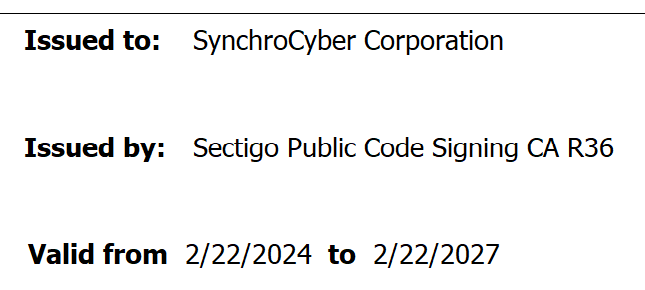
Code Signing Certificate Trust Chain:
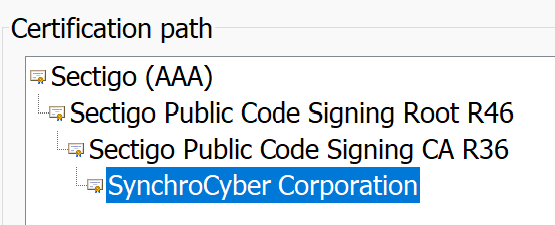
The trust chain can be downloaded from SynchroCyber:
Or it may be downloaded from Sectigo:
https://www.sectigo.com/knowledge-base/detail/Access-New-Sectigo-Certificate-Chain/kA0Uj0000005KHRKA2
Root Certificate Store
Sectigo AAA
Intermediate Certificate Store
Sectigo Public Code Signing Root R4
Sectigo Public Code Signing CA R36
Root Store:
AAA_Certificate_Services_Root.cer
Intermediate Store:
AAA_To_R46_Intermediate.cer
R46_to_R36_Intermediate.cer
The SynchroCyber FRTC Trust Path Automation Tool was developed by James Burke, an ICAM engineer with extensive experience supporting federal identity, credential, and access management programs. James specializes in smartcard authentication, PKI trust-path engineering, and FIPS 201–aligned PACS testing.
His work spans PIV, PIV-I, CAC, certificate validation, authentication mode behavior, and identity lifecycle integrations, including USAccess and SIP automation. James has supported federal ICAM modernization efforts, Zero Trust initiatives, and PACS engineering across multiple agencies and environments.
The tool was created to help vendors and engineering teams accelerate testing, reduce misconfigurations, and improve trust-path reliability — developed independently of any official GSA evaluation activities and fully compliant with conflict-of-interest and nondisclosure requirements.
Registered as a Certified Systems Engineer ICAM PACS (CSEIP) with Secure Technology Alliance. View our Certified Systems Engineer ICAM PACS (CSEIP) Certificate.
Fill out the request form to receive the latest version of the FRTC Trust Path Automation Tool v1.2.
You will receive an email with a digitally signed MSI installer. Download the .zip file of the latest FRTCTrustPath Tool v1.2. NOTE: The .MSI and the associated PowerShell scripts are digitally signed.
All components are signed with SynchroCyber’s Sectigo code signing certificate for integrity and authenticity.

17959 Dumfries Shopping Plaza, Suite 2B, Dumfries, VA 22026
Phone: 703.862.5500 | Email: contact@synchrocyber.com
Contact us to schedule a conversation about your ICAM, PACS, or USAccess needs.